How Search Engines Work: Crawling, Indexing & Ranking Explained
A clear, comprehensive guide breaking down how search engines work from discovery to search results. It explains the core concepts of crawling, indexing, and ranking with practical technical SEO insights and best practices to improve organic visibility.
Every second, tens of thousands of people type queries into search bars across the globe. Whether someone is looking for an emergency plumbing service, researching a historical event, or comparing enterprise software solutions, results appear in a fraction of a second.
To the average user, it looks as if Google or Bing instantly scans billions of live websites, evaluates their quality, and organizes them into an ordered list the moment the "Enter" key is pressed.
That is not what happens.
Search engines do not search the live internet in real time when a query is submitted. If they had to fetch and evaluate billions of remote web servers on demand, a single search could take minutes, hours, or crash entirely. Instead, search engines spend vast computational resources finding, reading, processing, cataloging, and evaluating web content long before a user ever conducts a search.
When you type a phrase into a search engine, you are actually querying an enormous, pre-sorted database that has already analyzed and organized trillions of pieces of digital information.
Understanding how a raw URL transforms from an unvisited link into a top-ranking search result is the foundation of digital marketing and search engine optimization. This lifecycle is governed by three primary, sequential stages:
Crawling → Indexing → Ranking
Between the moment you publish a fresh webpage and the moment it appears in Google Search, that page must pass through several technical filters, rendering engines, and evaluation systems. If a failure occurs at any single point in this pipeline, the page will not receive organic search traffic.
Let us walk through how search engines work from the ground up, dissecting what happens under the hood at every stage.
What Is a Search Engine?
A search engine is a specialized software program designed to discover, organize, store, and retrieve information across the World Wide Web. Its primary purpose is to connect human searchers with the most relevant, reliable, and accessible information matching their intent.
While Google holds the dominant global market share, other major search engines operate on similar fundamental principles:
- Google: The world's largest search engine, utilizing sophisticated discovery systems, neural networks, and machine learning models to interpret language and intent.
- Microsoft Bing: Powering its own search ecosystem as well as alternative search interfaces such as Yahoo and DuckDuckGo for traditional web results.
- Regional Search Engines: Platforms like Baidu (China), Yandex (Russia), and Naver (South Korea), which dominate specific international geographic markets.
Every modern search engine relies on two central assets: a search index (a proprietary database containing information about web pages, images, videos, and documents) and ranking algorithms (mathematical and machine-learning systems designed to score and sort that data).
The foundational relationship governing modern search can be summarized as:
$$\text{User Query} \longrightarrow \text{Search Engine Index} \longrightarrow \text{Ranking Systems} \longrightarrow \text{Search Engine Results Pages (SERPs)}$$
The Search Engine Results Page (SERP) is the final interface where users interact with organic listings, paid advertisements, local business packs, knowledge panels, direct answers, and interactive rich snippets.
How Do Search Engines Work?
Before exploring individual components in depth, it is helpful to look at the continuous end-to-end pipeline that search engines use to manage the web.
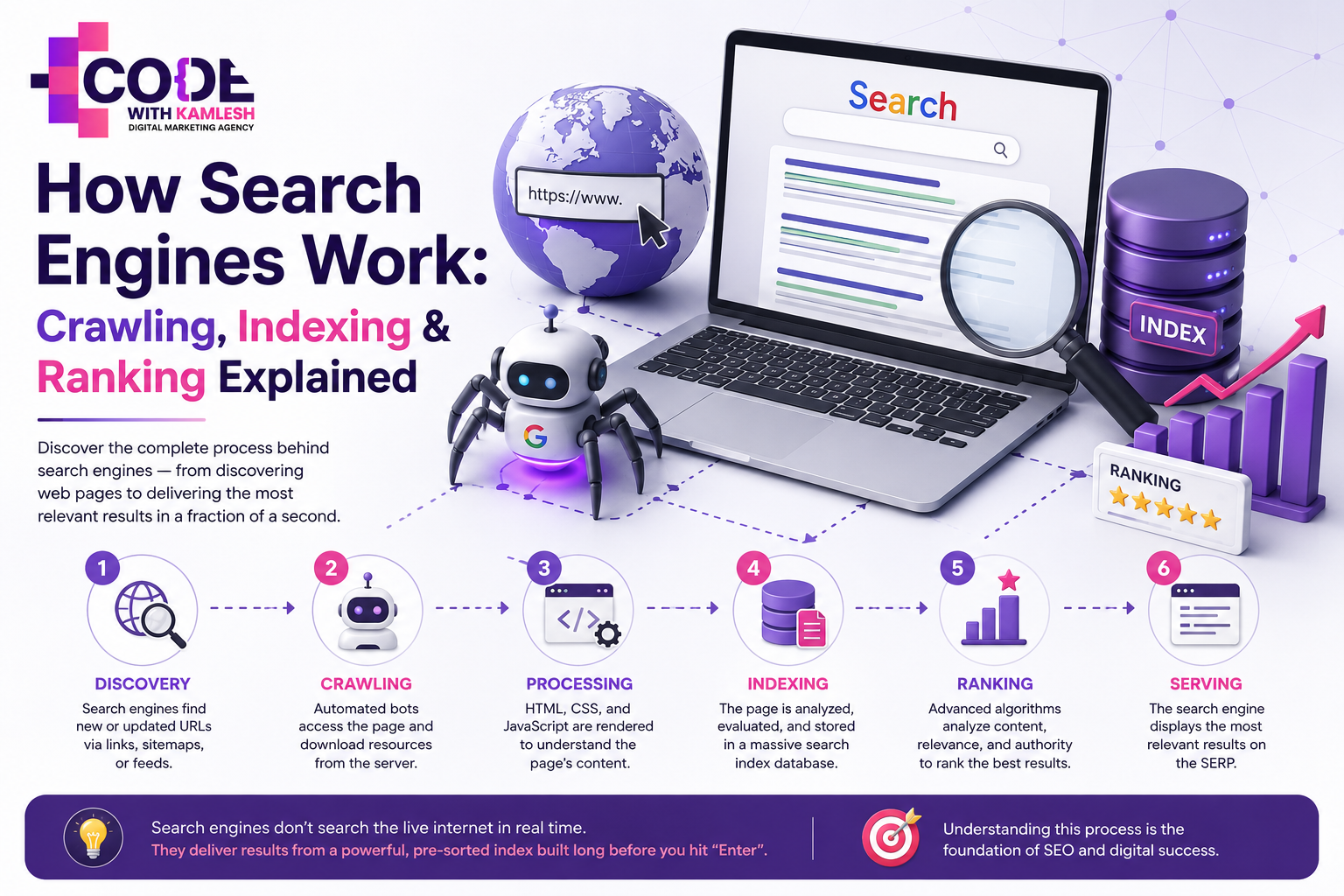
The complete search engine lifecycle operates across six interconnected phases:
{Discovery} \longrightarrow \text{Crawling} \longrightarrow \text{Rendering / Processing} \longrightarrow \text{Indexing} \longrightarrow \text{Ranking} \longrightarrow \text{Serving}
- Discovery: The search engine finds a URL it has never seen before, or identifies an update to a known URL.
- Crawling: An automated bot requests the page's code and assets from the hosting server.
- Rendering / Processing: The search engine executes code (including HTML, CSS, and client-side JavaScript) to construct the page layout and understand its contents.
- Indexing: The search engine evaluates whether the page meets quality, technical, and uniqueness standards, extracting its core information to store within a structured database.
- Ranking: Complex scoring algorithms analyze all candidate pages in the index to determine which documents best satisfy a given query.
- Serving: The search engine constructs the SERP with relevant features and displays the final ordered list to the user.
Stage
What Happens
Why It Matters for SEO
Discovery
Search engines find URLs via links, sitemaps, or feeds
Pages must be discoverable before they can ever be crawled
Crawling
Automated bots access the page and download resources
Content and media files must be crawlable and accessible
Processing
Code, text, visual structure, and scripts are parsed
Search engines need to execute JavaScript and understand layout
Indexing
Eligible content is stored and organized in the search index
Non-indexed pages cannot appear in organic search results
Ranking
Algorithms score candidate pages against specific queries
Determines your organic visibility and competitive positioning
Serving
Results are rendered on the SERP for the user
Connects your content directly with qualified searchers
While these phases are deeply interconnected, they are distinct processes. A failure in crawling prevents indexing; a failure in indexing prevents ranking. To optimize a website effectively, you must diagnose which specific phase is falling short.
PART 1 – CRAWLING
What Is Crawling?
Crawling is the automated discovery process in which search engine software programs systematically browse the web to find, fetch, and download pages and resources.
These programs are commonly referred to as bots, crawlers, or spiders.
Think of the World Wide Web as an infinite subway network. Each station is a webpage, and the tracks connecting the stations are hyperlinks. A web crawler travels along these tracks relentlessly, visiting a station, recording what it finds, looking at all the outbound tracks leaving that station, and following those tracks to find new stations.
Search engines do not possess a static master list of every webpage that exists. The web expands, contracts, and changes every second. Crawlers operate continuously to discover new URLs, download updated content on existing pages, and identify deleted resources.
How Do Search Engine Crawlers Discover New Pages?
Crawlers primarily discover new and updated content through four main pathways.
       [ External Backlinks ] --------+
                                      |
       [ Internal Site Links ] -------+---> [ URL Discovery Pipeline ] ---> [ Web Crawler (Googlebot) ]
                                      |
       [ XML Sitemaps ] --------------+
                                      |
       [ Previously Known URLs ] -----+
1. Internal Links
When you publish a new article or product page, the most direct way for a bot to find it is through links from other pages on your site. If your homepage links to your blog index, and your blog index links to your new post, the bot follows those standard HTML anchor tags (<a href="...">) to reach the target URL.
A logical internal architecture is the single most reliable foundation for crawling.
2. External Links (Backlinks)
When a third-party website links to your domain, crawlers discovering or re-crawling that external page will identify the outbound hyperlink pointing to your site. Backlinks serve a dual purpose: they pass contextual authority and act as primary discovery paths for new domains and orphaned URLs.
3. XML Sitemaps
An XML sitemap is a structured file hosted on your web server that lists all the canonical URLs you want search engines to discover, along with optional metadata like last modification dates.
Submitting a sitemap via Google Search Console or Bing Webmaster Tools acts as a direct notification system.
It is important to remember that an XML sitemap is a discovery hint, not a guarantee. It tells search engines where your pages live, but it does not compel them to crawl or index every listed URL.
4. Previously Known URLs
Search engines maintain historical records of discovered URLs. They systematically re-crawl these addresses at varying intervals to detect changes in content, layout, headers, or status codes (such as 404 Not Found or 301 Moved Permanently).
What Is Googlebot?
Googlebot is the generic name for Google's web crawling software. Googlebot is not a single entity running on an office computer; it is a distributed software system operating across thousands of machines worldwide.
Google operates two primary types of crawlers:
- Googlebot Smartphone: A mobile crawler that simulates a user accessing a website via a modern mobile device.
- Googlebot Desktop: A desktop crawler that simulates a user visiting from a traditional desktop browser.
Google primarily uses mobile-first indexing, meaning Googlebot inspects, renders, and evaluates the mobile version of a website's content to determine its indexing and ranking. If your desktop version contains comprehensive technical data but your mobile layout hides that text to save visual space, search engines may not evaluate that hidden content for ranking purposes.
Googlebot operates through a two-stage fetching and rendering process:
- Initial Fetch: The bot downloads the raw server response (HTML, text, and header data).
- Web Rendering Service (WRS): If the page relies heavily on client-side JavaScript framework execution (such as React, Angular, or Vue) to generate text or links, the URL enters a rendering queue. The WRS runs a headless browser instance to execute scripts, assemble the Document Object Model (DOM), and discover dynamically injected content.
What Is Crawl Budget?
In SEO discussions, crawl budget refers to the number of URLs on a given website that a search engine bot can and wants to crawl within a specific timeframe.
Crawl budget is shaped by two core dynamics:
[ Crawl Rate Limit ]  <-- (Server capacity, host responsiveness, user experience preservation)
         +
[ Crawl Demand ]      <-- (Site popularity, update frequency, page quality, internal authority)
         ||
[ Effective Crawl Budget ]
- Crawl Rate Limit (Crawl Capacity): Search engines avoid overloading your web hosting infrastructure. If your server responds rapidly, bots may increase their request rate. If your server slows down, times out, or returns 503 Service Unavailable errors, Googlebot immediately throttles its crawling speed to avoid degrading the experience for human visitors.
- Crawl Demand (Crawl Scheduling): How much does Google actually want to crawl your website? Highly authoritative, frequently updated websites (such as national news outlets or high-volume eCommerce platforms) experience high crawl demand. Dormant sites with stale content experience low crawl demand.
For small-to-medium websites (under 10,000 pages), crawl budget is rarely a bottleneck. As long as your server is healthy and your internal linking is sensible, search engines will comfortably discover your pages.
For large enterprise websites, marketplaces, and eCommerce stores with hundreds of thousands or millions of pages, crawl budget optimization becomes critical.
Common crawl budget drains include:
- Faceted Navigation & Parameter URLs: Filter systems generating infinite URL variations for colors, sizes, and price sorts without parameter handling.
- Duplicate Content: Multiple URLs serving identical or near-identical text.
- Soft 404s: Pages displaying an "item not found" message while incorrectly returning an HTTP 200 OK status code.
- Redirect Chains: Stacking multiple redirects (e.g., URL A -> URL B -> URL C), which forces the bot to spend multiple server requests just to reach a single destination.
- Hacked or Low-Quality URLs: Spammed directories or auto-generated low-value programmatic pages.
What Can Prevent Search Engines from Crawling a Page?
Search engines can only evaluate what they are permitted and able to fetch. Several technical barriers can prevent a web crawler from accessing your URLs:
1. The robots.txt File
The robots.txt file is a plain-text document placed in the root directory of your domain (e.g., [example.com/robots.txt](https://example.com/robots.txt)). It instructs web crawlers which parts of your site they are allowed or forbidden from requesting.
For instance, this directive blocks all compliant crawlers from accessing your checkout pages:
HTTP
User-agent: *
Disallow: /checkout/
Crucial Technical Distinction: A Disallow rule in robots.txt stops the bot from crawling the page content. It does not guarantee that the page will never appear in search results. If an external site links to a disallowed URL with descriptive anchor text, Google may still list the URL in the SERPs based on those link signals alone, displaying an empty snippet without page text.
To learn how to configure these rules safely, review the official Google Search Central robots.txt specifications.
2. Orphan Pages
An orphan page is a live URL that has zero internal links pointing to it from anywhere on the same website. Unless the page is included in an XML sitemap or has external backlinks, crawlers cannot navigate to it naturally.
3. Server Errors and Poor Response Times
Repeated server errors (500 Internal Server Error, 502 Bad Gateway, 504 Gateway Timeout) cause crawlers to abandon crawl attempts to prevent site downtime.
4. Authentication and Access Walls
Pages protected behind user login screens, basic HTTP authentication, paywalls (without structured access tags), or aggressive firewall rules that misidentify Googlebot as malicious traffic will block crawlers from reading your source code.
5. Client-Side JavaScript Rendering Obstacles
If critical navigation links or core text require complex, long-running JavaScript execution, or if scripts fail due to syntax errors or blocked .js bundles in robots.txt, crawlers may encounter an empty screen and fail to extract internal links.
PART 2 – INDEXING
What Is Search Engine Indexing?
Once a crawler fetches a page, the next stage of the pipeline begins: indexing.
Indexing is the process by which a search engine parses, analyzes, and stores the information from a crawled webpage in an enormous, structured database known as the search index.
Think of the search index like the index at the back of a massive library book, but scaled to cover the public web.
Instead of searching through millions of physical pages for the term "mechanical keyboard repair," the index instantly references a pre-computed entry for that subject, complete with an organized list of every indexed document that covers it, where the term appears on those pages, and associated contextual signals.
Being crawled does not guarantee that a page will be added to this database. Crawling is simply the act of collecting the raw digital file; indexing is the decision to keep it, process it, and make it available for retrieval.
How Does Google Decide Whether to Index a Page?
During indexing, Google runs the parsed content through sophisticated evaluation systems. The search engine must decide: Is this page valuable, unique, and technically suitable enough to store in our database?
Key signals influencing indexing decisions include:
- Content Quality and Substance: Pages with very little unique text ("thin content"), auto-generated gibberish, or shallow scraped copy are frequently discarded during processing.
- Duplicate and Near-Duplicate Content: If a webpage is substantially identical to another page already stored in the index, the search engine will choose one representative version and ignore the duplicates to conserve storage and maintain search quality.
- Canonical Directives: If a page contains a canonical link element pointing to a different URL, the search engine will generally index the designated target instead.
- Index Directives (Meta Robots Tags): If a page's HTML <head> contains <meta name="robots" content="noindex">, or if the server delivers an X-Robots-Tag: noindex HTTP header, search engines are explicitly instructed not to store the page in the search index.
- Renderability: If a page crashes during JavaScript execution or renders blank content, the indexing engine has no substantive information to extract.
- Site-Level Quality Patterns: Search engines monitor overall domain quality. If a large percentage of a website's pages are low-value, thin, or broken, crawlers may raise the quality threshold required for any new page from that domain to get indexed.
There is no single "indexing score." Indexing is the outcome of a complex pipeline evaluating technical signals, content distinctiveness, and processing efficiency.
Crawling vs Indexing – What Is the Difference?
Mixing up crawling and indexing is one of the most common mistakes made by developers and new SEOs.
To clear up any confusion:
+-----------------------------------------------------------------------------------+
| CRAWLING                                                                          |
| "Can search engines find and fetch your page files?"                             |
| Focus: Network connectivity, server responses, robots.txt, HTTP headers.          |
+-----------------------------------------------------------------------------------+
                                         │
                                         ▼
+-----------------------------------------------------------------------------------+
| INDEXING                                                                          |
| "Can search engines understand, evaluate, and store your page content?"          |
| Focus: Meta tags, canonicals, content uniqueness, rendering, DOM structure.       |
+-----------------------------------------------------------------------------------+
Factor
Crawling
Indexing
Primary Action
Fetching and downloading a URL's code and assets
Analyzing, interpreting, and storing the page's data
Executing System
Web crawlers (e.g., Googlebot, Bingbot)
Rendering engines and indexing pipelines
Prerequisites
URL discovery and an accessible server
Successful crawling and processing
Core Directives
Governed by robots.txt and server status codes
Governed by noindex tags, canonicals, and content quality
Diagnostic Status
"Crawled" in server access logs
"Indexed" in Google Search Console reports
Relationship
You can crawl a page without indexing it
You cannot index a page without discovering and crawling it first
Practical Scenario
Imagine you launch a promotional campaign page with the following meta tag in the HTML head:
HTML
<meta name="robots" content="noindex, follow">
Googlebot will comfortably crawl this page by requesting the URL, downloading the HTML, and following any links on it.
However, during processing, the indexing engine detects the noindex directive, halts the process, and excludes the URL from the search index. The page was successfully crawled, but intentionally not indexed.
Why Is My Page Crawled but Not Indexed?
In Google Search Console's Page Indexing report, webmasters frequently encounter the status: "Crawled - currently not indexed."
This status means Googlebot successfully fetched the page from your server, parsed the code, but the indexing system decided not to add the URL to its search database.
The most common causes include:
                                [ Crawled - Currently Not Indexed ]
                                                 │
       ┌──────────────────┬──────────────────────┴──────────────────────┬──────────────────┐
       ▼                  ▼                                             ▼                  ▼
[ Thin / Low Value ]  [ Duplicate Content ]                     [ Soft 404 Pages ]  [ Canonical Conflicts ]
- Thin Content: The page does not offer enough unique, substantive value compared to existing web resources on the same topic.
- Duplicate or Near-Duplicate Content: The page is nearly identical to an existing URL on your site (e.g., identical product pages with only minor color differences).
- Soft 404 Errors: The page looks like a missing or blank page to the rendering engine, despite returning an HTTP 200 OK status.
- Algorithmic Canonicalization: Google determined that another URL on the web (or within your own site) is a more appropriate canonical representative of this content.
- New Domain / Lack of Domain Authority: For brand-new sites, search engines may crawl several pages but index them slowly over time as the domain establishes trust and consistent publishing patterns.
What Is a Canonical URL?
When multiple URLs host identical or highly similar content, search engines must determine which single address represents the "master" or canonical version.
For example, an eCommerce store might generate several URLs for one product:
- [https://example.com/shoes/running-shoe](https://example.com/shoes/running-shoe)
- [https://example.com/shoes/running-shoe?color=blue](https://example.com/shoes/running-shoe?color=blue)
- [https://example.com/products/running-shoe](https://example.com/products/running-shoe)
If Google indexed all three versions, it would dilute search metrics across three separate listings.
To resolve this, website owners specify a preferred URL using a canonical link element in the page <head>:
HTML
<link rel="canonical" href="https://example.com/shoes/running-shoe" />
A self-referencing canonical tag (a tag on [https://example.com/page](https://example.com/page) that explicitly points to [https://example.com/page](https://example.com/page)) is a standard best practice that prevents duplication caused by tracking parameters, session IDs, and trailing slash variations.
Important Caveat: A canonical tag is a signal, not a directive. Unlike a hard command like noindex, Google weighs your canonical tag alongside other signals, including internal links, XML sitemaps, and redirects. If your canonical tag points to URL A, but all your internal links and sitemaps point to URL B, Google's algorithms may disregard your canonical tag and select URL B instead.
For a deeper look at managing duplicate parameters and crawl architecture, explore our guide on [INTERNAL LINK 1 – Insert relevant Code With Kamlesh SEO article URL].
PART 3 – RANKING
What Is Search Engine Ranking?
Once a page is discovered, crawled, processed, and stored in the search index, it becomes eligible for the final stage: ranking.
Ranking is the process by which a search engine evaluates all eligible indexed documents against a specific user query and orders them by relevance, utility, and quality.
It is essential to remember:
{Crawled} \neq \text{Indexed} \neq \text{Ranked Highly}
A page can sit happily in Google's index for months without ever receiving a click. Indexing simply gets you into the candidate pool; ranking determines whether you appear on page one or get buried on page ten.
+-----------------------------------------------------------------------------------+
| 1. Crawled: The search engine downloaded your page.                               |
| 2. Indexed: The search engine stored your page in its database.                   |
| 3. Ranked:  Algorithms selected your page as the best answer for a user's search. |
+-----------------------------------------------------------------------------------+
How Does Google Rank Search Results?
Google does not rely on a single algorithm to rank pages. Instead, it uses an interconnected collection of specialized algorithms, machine learning models, and heuristic systems.
Rather than imagining an oversimplified, static list of "Google's 200 ranking factors," it is more accurate to view modern ranking systems as evaluating multiple dynamic categories:
- Query Meaning & Language Processing: Interpreting what the searcher is truly trying to find, understanding synonyms, parsing conversational phrases, and correcting typos.
- Content Relevance: Evaluating whether the on-page text, headings, media, and structure comprehensively address the specific concepts and entities in the search query.
- Content Quality & Depth: Assessing whether the content demonstrates expertise, depth, original research, and thoroughness.
- Page Experience & Usability: Checking if the page loads quickly, displays cleanly on mobile screens, avoids intrusive layout shifts, and serves content securely over HTTPS.
- Context and Personalization: Factoring in the user's geographic location, search history settings, language preferences, and device type.
- Website Authority and Trust: Evaluating the site's historical reputation and the external link graph pointing to the domain.
- Spam Detection: Identifying keyword stuffing, hidden text, link manipulation schemes, and deceptive practices, and filtering those pages out before the final results are served.
To understand how these systems coordinate under real-world conditions, refer to the Microsoft Bing Webmaster Guidelines on ranking principles and evaluation.
Understanding Search Intent
Search intent (also called user intent) is the primary goal a person has when typing a query into a search engine.
Search algorithms have evolved to prioritize intent matching above raw keyword matching. If your page repeats a target keyword fifty times but fails to deliver the format and information the user needs, it will struggle to rank.
Search intent falls into four primary classifications:
                                      [ Search Intent Types ]
                                                 │
       ┌──────────────────┬──────────────────────┴──────────────────────┬──────────────────┐
       ▼                  ▼                                             ▼                  ▼
[ Informational ]   [ Navigational ]                             [ Commercial ]    [ Transactional ]
 "how to fix code"   "github login"                               "best code editor" "buy ide license"
1. Informational Intent
The user wants to learn something, understand a concept, or troubleshoot an issue.
- Example Keyword: how to change a flat tire
- Ideal Content Format: Step-by-step guides, instructional articles, explainer videos, clear definitions.
2. Navigational Intent
The user wants to find a specific website or branded destination
- Example Keyword: canva login
- Ideal Content Format: Official portal pages, brand homepages, direct service destinations.
3. Commercial Investigation Intent
The user intends to buy or subscribe in the future, but is currently researching options, comparing competitors, and reading reviews.
- Example Keyword: best crm software for small business
- Ideal Content Format: Comparison roundups, feature teardowns, pros-and-cons lists, pricing breakdowns.
4. Transactional Intent
The user is ready to make a purchase, complete a signup, or download a resource immediately.
- Example Keyword: buy organic whole bean coffee online
- Ideal Content Format: Optimized eCommerce product pages, clean pricing tables, frictionless checkout funnels.
If the top-ranking results for a query are all interactive tools or step-by-step guides, publishing a sales page targeting that exact keyword will rarely succeed. The format of your content must align with what the search engine has determined searchers want to see.
Content Quality and Relevance
Ranking systems evaluate whether an indexed document provides a direct, comprehensive, and clear answer to a user's question.
High-ranking content generally displays several consistent characteristics:
- Thorough Problem-Solving: It resolves the user's inquiry completely, eliminating the need for them to return to the search results to find a better answer.
- Originality: It provides unique perspectives, original case studies, data points, or expert insights rather than simply summarizing what other articles already say.
- Clear Visual Structure: It uses clean heading hierarchies (H2, H3), logical lists, concise tables, and diagrams to make complex information easy to scan.
- Accuracy: It contains factually sound, up-to-date information written with genuine subject-matter familiarity.
In quality evaluation discussions, SEOs frequently reference E-E-A-T (Experience, Expertise, Authoritativeness, and Trustworthiness).
E-E-A-T is not a single, isolated ranking score in Google's database. Instead, it represents a conceptual framework that Google uses in its Search Quality Rater
Guidelines, supported by a combination of algorithmic signals designed to surface trustworthy, reliable information.
Backlinks and Authority
A backlink is an inbound link from an external website pointing to your page.
When Tim Berners-Lee invented the World Wide Web, hyperlinks were designed as structural citations. In the late 1990s, Google's founders developed the PageRank algorithm, based on the insight that links could serve as mathematical votes of confidence.
[ Authoritative Site A ] ──(Editorial Link)──┐
                                             ▼
[ Niche Resource Site B ] ──(Editorial Link)──► [ Your Webpage ]  ===> Higher Authority & Rankings
                                             ▲
[ Industry Blog Site C ] ───(Editorial Link)──┘
When an established, high-quality website links to your content, it signals to search engines that your page contains reliable, useful information.
However, modern link evaluation focuses on relevance and editorial authenticity, not raw numbers:
- Relevance: A backlink from a respected programming portal to a coding tutorial carries significantly more contextual weight than an irrelevant link from a recipe blog.
- Editorial Standards: Links earned naturally because your content serves as a great resource are highly valued.
- Link Schemes and Spam: Purchasing hundreds of automated forum links, directory submissions, or private blog network (PBN) placements violates search engine guidelines. Modern spam detection algorithms identify and neutralize these patterns, and manipulative link building can lead to algorithmic devaluation or manual penalties.
Technical SEO and Ranking
While content relevance and authority provide the foundation for search rankings, technical SEO ensures your site can be crawled, parsed, and rendered efficiently.
Technical SEO factors that directly or indirectly influence search visibility include:
- Architecture & Internal Linking: A logical site structure allows link authority to flow smoothly to deeper pages.
- Mobile Performance: Ensuring layouts scale correctly without breaking across various mobile viewports.
- Page Performance (Core Web Vitals): Measuring visual stability, interactivity response times, and loading speeds to protect real-world user experience.
- HTTPS Protocol: Serving content over encrypted connections to protect user privacy and data security.
- Structured Data Markup (Schema.org): Supplying standardized code snippets to help search engines understand entities, reviews, FAQs, events, and recipes, often unlocking rich snippets on the SERP.
- URL Cleanliness: Maintaining simple, readable URL structures free from unnecessary redirect loops.
To configure clean URL structures and debug server response codes, review our breakdown on [INTERNAL LINK 2 – Insert relevant Code With Kamlesh technical SEO article URL].
How Search Engines Process a Search Query
To see how these concepts come together, let us walk through what happens when a user types the query: "best digital marketing course for beginners" into Google.
[ User Searches: "best digital marketing course for beginners" ]
                          │
                          ▼
[ 1. Query Processing: Parse synonyms, identify commercial/informational intent ]
                          │
                          ▼
[ 2. Index Retrieval: Pull candidate documents matching entities & context ]
                          │
                          ▼
[ 3. Algorithmic Ranking: Score for relevance, quality, page experience, links ]
                          │
                          ▼
[ 4. SERP Construction: Render listings, review snippets, and answer boxes ]
- Query Interpretation: Natural language models analyze the search query. The system determines that "course" relates to training or education, "beginners" indicates foundational material rather than advanced instruction, and "best" signals a commercial investigation intent comparing multiple options.
- Candidate Retrieval: The search engine queries its index to identify all candidate documents containing relevant entities, topics, and contextual terms matching the parsed query.
- Applying Scoring Models: Ranking systems evaluate the retrieved candidate set. They weigh content freshness, review quality, curriculum details, domain authority, backlink profiles, mobile usability, and page speed.
- SERP Assembly and Serving: The engine selects the top-scoring pages, extracts relevant snippets to generate preview titles and descriptions, appends rich snippets (such as star ratings or course durations), and serves the finished results page to the user in roughly 300 to 500 milliseconds.
COMPLETE PROCESS
Crawling, Indexing and Ranking – Complete Example
To see how the entire lifecycle works from start to finish, let us follow a new article through the pipeline:
Suppose you publish a guide titled "Beginner's Guide to Technical SEO" at the URL [https://example.com/technical-seo-guide](https://example.com/technical-seo-guide).
[ Step 1: Article Published on Website ]
                 │
                 ▼
[ Step 2: Discovery via XML Sitemap & Internal Links ]
                 │
                 ▼
[ Step 3: Googlebot Fetches HTML and Assets (Crawling) ]
                 │
                 ▼
[ Step 4: Web Rendering Service Executes JavaScript (Processing) ]
                 │
                 ▼
[ Step 5: Content Evaluated and Stored (Indexing) ]
                 │
                 ▼
[ Step 6: Query Matched, Scored, and Displayed on SERP (Ranking) ]
                 │
                 ▼
[ Step 7: Searchers Click Listing (Organic Traffic) ]
- Publishing: You push the new article live on your content management system.
- Discovery: Your CMS automatically adds the new URL to your XML sitemap. At the same time, your blog index updates with a link to the new post. Googlebot crawls your blog index, discovers the new link, and adds the URL to its crawl queue.
- Crawling: Googlebot requests [https://example.com/technical-seo-guide](https://example.com/technical-seo-guide). Your web server returns an HTTP 200 OK status along with the raw HTML, CSS, and media assets.
- Processing & Rendering: The Web Rendering Service processes the page's HTML structure, evaluates the stylesheet rules, and executes any client-side JavaScript to render the full visual DOM.
- Indexing: The indexing engine inspects the rendered text. It confirms that the page does not contain a noindex tag, verifies that the self-referencing canonical tag is valid, confirms the content is original and useful, and indexes the document.
- Ranking: A searcher enters the query technical seo basics for beginners. Google’s ranking systems match the query against the stored index entry, evaluate its relevance, link signals, and page experience, and place the guide on page one of the search results.
- Organic Traffic: Searchers see the listing, find the title and snippet compelling, and click through to read your article.
Crawling vs Indexing vs Ranking
Factor
Crawling
Indexing
Ranking
Primary Purpose
Discover, fetch, and download web resources
Parse, analyze, categorize, and store webpage data
Evaluate, score, and position pages for specific search queries
Main Process
Automated bots request URLs over HTTP/HTTPS
Rendering engines parse HTML, JS, and evaluate content value
Machine learning models and ranking algorithms sort candidate URLs
Key SEO Concern
Ensuring server availability, clean architecture, and open crawl paths
Ensuring original content, canonical alignment, and correct index tags
Matching user search intent, demonstrating topic authority, and earning links
Common Problems
Blocked in robots.txt, slow servers, broken redirects, orphan URLs
noindex tags, duplicate content, soft 404s, poor content quality
Weak relevance, mismatched search intent, insufficient authority, bad page speed
Useful Tools / Checks
Server access logs, robots testing tools, network inspection
Google Search Console URL Inspection, Index Coverage reports
Search Console Performance reports, keyword rank tracking software
SEO IMPLEMENTATION
How to Make Your Website Easier for Search Engines to Crawl and Index
Building a search-friendly website comes down to removing technical hurdles so crawlers and indexing systems can easily discover and process your pages.
       [ Structured Architecture & Logical Internal Links ]
                                │
       [ Valid XML Sitemaps Submitted in Search Console ]
                                │
       [ Clean robots.txt without Unintended Blocks ]
                                │
       [ Unique, High-Quality Content & Canonical Tags ]
                                │
       [ Mobile-Friendly Design & Fast Server Speeds ]
1. Maintain a Logical, Shallow Site Architecture
Design your site so any public page can be reached within three to four clicks from the homepage. A clear hierarchical structure makes URL discovery straightforward for crawlers and helps users navigate your content easily.
2. Build Intentional Internal Links
Link contextually between related articles and category hubs using descriptive anchor text. Internal links provide natural crawl paths and help distribute page authority across your site.
3. Generate and Submit Clean XML Sitemaps
Ensure your XML sitemap includes only canonical, live, indexable URLs (avoid including 404, redirected, or noindex pages). Submit your sitemap directly to Google Search Console and Bing Webmaster Tools.
4. Review Your robots.txt Configuration
Audit your robots.txt file regularly to confirm you are not accidentally blocking vital resource files (like CSS and JavaScript assets) or entire site sections that should be publicly visible.
5. Configure Explicit Canonical Tags
Add self-referencing canonical tags to all unique pages to prevent duplicate content issues caused by dynamic tracking parameters, sorting filters, or alternate domain protocols.
6. Prevent Accidental noindex Tags in Production
Ensure that testing flags (such as development noindex headers) are removed when deploying new pages or site updates to your live production environment.
7. Optimize Server Performance and Response Times
Use reliable hosting, implement page caching, and leverage Content Delivery Networks (CDNs) to keep server response times well under 600ms. Fast servers allow Googlebot to crawl pages smoothly without running into crawl rate limits.
Common SEO Mistakes That Affect Crawling, Indexing and Ranking
Even experienced teams run into technical SEO issues that harm organic search visibility. Here are the most common pitfalls to watch for:
- Leaving noindex Tags on Live Pages: Accidentally leaving staging environment meta tags on production pages after a website redesign, causing the entire site to drop out of search results.
- Blocking JavaScript and CSS in robots.txt: Disallowing search engines from downloading stylesheet and script files. This prevents Googlebot from rendering pages correctly, which can lead to layout issues and failed indexing.
- Allowing Search-Driven Duplicate Content: Permitting faceted navigation systems to generate thousands of indexed URL variations with identical product lists, diluting site authority and wasting crawl resources.
- Neglecting Redirect Chains: Chaining multiple historical redirects (e.g., [http://site.com](http://site.com) → [https://site.com](https://site.com) → [https://www.site.com](https://www.site.com) → [https://www.site.com/new-path/](https://www.site.com/new-path/)). Update old links to point directly to the final destination URL instead.
- Ignoring Broken Internal Links: Leaving dead links (404 Not Found) throughout your navigation and content, which wastes crawl capacity and creates poor user experiences.
- Keyword Stuffing and Intent Mismatches: Repeating unnatural keyword variations instead of addressing what the searcher is actually trying to accomplish.
How to Check Whether Google Has Indexed Your Page
Never guess whether your content is indexed. Use direct diagnostic tools to verify its status:
Method 1: The Google Search Console URL Inspection Tool (Most Accurate)
- Open Google Search Console.
- Paste the complete URL into the top search bar.
- Review the status report:
- "URL is on Google": The page is successfully crawled, processed, and stored in the search index.
- "URL is not on Google": The tool will display specific reasons (e.g., Excluded by ‘noindex’ tag, Crawled - currently not indexed, or Discovered - currently not indexed).
+-----------------------------------------------------------------------------------+
| GOOGLE SEARCH CONSOLE - URL INSPECTION                                            |
| URL: https://example.com/technical-seo-guide                                      |
| Status: URL is on Google                                                          |
| Coverage: Indexed, not submitted in sitemap                                      |
| Mobile Usability: Page is usable on mobile                                        |
+-----------------------------------------------------------------------------------+
Method 2: The site: Search Operator (Rough Check)
Type site:[yourdomain.com/exact-page-url](https://yourdomain.com/exact-page-url) into Google’s search bar.
If the page appears in the results, it confirms the URL is present in Google’s index.
Important Diagnostic Note: The site: operator is a helpful discovery check, but it is not a complete diagnostic tool. It can occasionally show outdated cache entries or omit recently indexed documents. For definitive technical status, always rely on Google Search Console.
Does Indexing Guarantee Ranking?
No. Indexing does not guarantee ranking.
Indexing simply confirms that a search engine has stored your webpage in its database and made it eligible to appear in search results.
       [ Discovered & Crawled ]
                  │
                  ▼
       [ Accepted into Index ]  <─── YOU ARE HERE (Eligibility Only)
                  │
                  ▼
       [ Algorithmic Evaluation ]
                  │
       ┌──────────┴──────────┐
       ▼                     ▼
[ Page 1 (Top Rank) ]   [ Page 8 (Low Visibility) ]
An indexed page might still receive zero organic traffic for several reasons:
- High Competition: Competitors may have more comprehensive content, stronger backlink profiles, and higher domain authority.
- Poor Search Intent Alignment: The page format does not match what users are looking for.
- Weak Topical Depth: The content only skims the surface of the subject.
- Suboptimal User Experience: Slow page loads, intrusive interstitials, or poor mobile layouts.
Indexing gets you to the starting line. High rankings require high relevance, strong authority, and a great user experience.
Frequently Asked Questions About How Search Engines Work
What are the three main stages of how search engines work?
The three primary stages are crawling (discovering and downloading URLs), indexing (processing, parsing, and storing page content in a database), and ranking (evaluating and ordering indexed pages to serve the best results for a user query).
What is crawling in SEO?
Crawling is the automated process where search engine bots (such as Googlebot) discover new and updated web pages by following hyperlinks, reading XML sitemaps, and requesting resources from web servers.
What is indexing in SEO?
Indexing is the process where a search engine parses the code, content, and structure of a crawled page, checks its quality and canonical status, and stores that information in its search database so it can be retrieved for relevant searches.
What is ranking in SEO?
Ranking is how search engines score and order all eligible indexed pages for a given search query, placing the most relevant, reliable, and helpful results at the top of the SERP.
How does Google find a brand-new website?
Google discovers new websites when external domains link to them, when a site owner submits an XML sitemap via Google Search Console, or when the domain is referenced on previously crawled pages.
How long does it take Google to index a new page?
Indexing timelines vary. A new page on an established, frequently crawled website can be indexed within minutes or hours. For new domains with few inbound links, discovery and indexing can take several days or weeks.
Does crawling guarantee indexing?
No. Crawling only means a bot downloaded your page's code. If the page contains a noindex tag, has thin or duplicate content, or fails basic quality thresholds, Google may choose not to index it.
Can a page rank without being indexed?
No. A webpage must be stored in the search engine's index before it can be scored, retrieved, and served as a standard organic search result.
What is Googlebot?
Googlebot is the automated web crawling software operated by Google. It continuously scans the internet to discover, fetch, and download webpages to keep Google’s search index up to date.
What is crawl budget?
Crawl budget is the total volume of URLs on a website that Googlebot is able and willing to crawl during a given timeframe. It is determined by your server's capacity and your site's overall popularity and update frequency.
How can I help Google crawl my website more efficiently?
Ensure your server responds quickly, establish a clean internal linking structure, keep your XML sitemap updated, fix broken links and redirect chains, and avoid blocking critical resources in your robots.txt file.
Why is my website indexed but not ranking?
Being indexed simply means your page is stored in Google's database. If your page is not ranking well, it usually means competitors offer more comprehensive content, have stronger backlink authority, match search intent better, or deliver a superior user experience.
The Big Picture
Search engine optimization becomes much simpler once you recognize that search visibility is a sequential, step-by-step pipeline.
       [ 1. CRAWLABLE ]   ──►  Can bots access and fetch your resources?
              │
              ▼
       [ 2. INDEXABLE ]   ──►  Is your content valuable, unique, and allowed to be stored?
              │
              ▼
       [ 3. RANKABLE ]    ──►  Does your page answer the searcher's intent better than any other?
- If your server blocks bots, your page cannot be crawled.
- If your content is thin, duplicate, or marked noindex, it will not be indexed.
- If your page fails to satisfy the user's search intent, it will not rank.
When diagnosing search traffic issues, avoid guessing. Trace the lifecycle of your URLs step by step. Once your pages are reliably discovered, properly indexed, and focused on solving real user problems, sustainable organic traffic will follow.
© 2026 Code with Kamlesh. All rights reserved.
Kamlesh Singad
Founder, Code With Kamlesh. Helped 200+ businesses scale through SEO, Google Ads & Social Media. 8+ years of digital marketing experience.
Comments (0)
No comments yet. Be the first to comment!