Internal Linking for SEO: Complete Guide to Better Rankings
Learn how internal linking improves SEO, website structure, crawlability, and user experience. This guide covers anchor text, link placement, common mistakes, and practical internal linking best practices for better rankings.
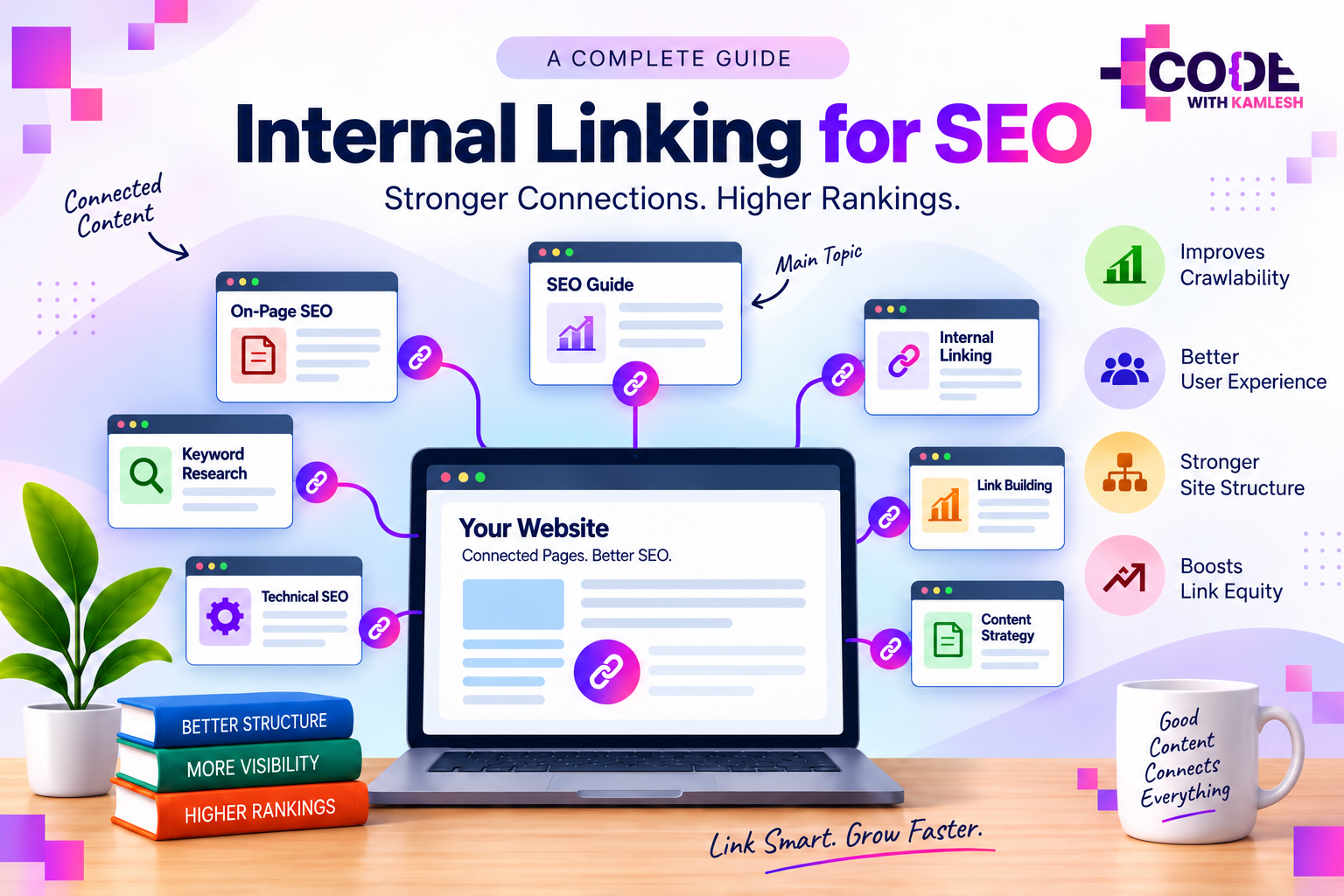
Internal linking is the practice of connecting one page of a website to another page on the same domain. These links help visitors move naturally through related content while giving search engines clearer paths to discover pages, understand relationships, and interpret site structure. Good internal linking does not depend on placing as many links as possible. Relevance, context, hierarchy, and usefulness matter far more than raw link count.
For SEO, internal links sit between content and site architecture. Content explains a topic, while internal links show how individual pages belong together. That connection can make important pages easier to find and can clarify which pages cover broad subjects, supporting topics, or specific subtopics.
What Is Internal Linking in SEO?
An internal link points from one URL to another URL on the same website. For example, a link from /seo-guide/ to /internal-linking/ is internal because both pages belong to the same domain. Search engines can follow such links to find related URLs, while readers can use them to continue exploring a subject without returning to a menu or search bar.
Internal links appear in body copy, navigation menus, breadcrumbs, category pages, sidebars, footers, and related-content sections. Their SEO value depends heavily on where they appear and why they exist. Contextual links inside relevant content usually communicate a stronger topical relationship than generic sitewide footer links.
Internal Links vs External Links vs Backlinks
Link TypeWhat It ConnectsMain Purpose
Internal link
Two pages on the same website
Navigation, discovery, structure, context
External link
One website to another website
Referencing or directing to an outside source
Backlink
Another website to a page on the site
External authority, discovery, referral traffic
These terms describe different directions of linking, not interchangeable SEO tactics. Internal links are controlled within a website, whereas backlinks originate elsewhere. External links point outward, while internal links keep the journey inside the same site.
Why Is Internal Linking Important for SEO?
Internal linking matters because search engines need connections between pages, not isolated documents. Excellent content can still become difficult to discover or understand when connections between related pages are weak. Strong linking creates a clearer network around topics and gives both users and crawlers more obvious paths through that network.
Search engines also use links as contextual signals. Words surrounding a link, its anchor text, the source page, and the destination page together help explain the relationship between two URLs. When several relevant pages naturally point toward one central resource, that pattern can reinforce the resource’s role within the broader topic.
Internal links also help distribute link equity across a website. Pages that attract backlinks or already hold stronger authority can pass some value through their internal links to other relevant pages. This does not mean every important page should be linked from everywhere; relevance remains essential.
User experience is another part of the same equation. Readers often arrive on a page with one question and develop a second question while reading. Well-placed links reduce friction by making the next useful piece of information easy to reach.
How Internal Links Help Search Engines Understand a Website
Site structure becomes easier to interpret when internal links reflect a logical content hierarchy. Broad pages can connect to narrower supporting pages, while supporting pages can link back to the main topic where it makes sense. This creates visible relationships between parent topics, subtopics, and closely related concepts.
Consider a website with a main SEO guide. Separate pages may cover keyword research, on-page SEO, technical SEO, internal linking, and link building. Connecting those pages around the main SEO resource forms a topical group rather than a collection of unrelated articles.
Search engines can use these connections to understand which pages are central and which pages provide depth. Important pages often receive more meaningful internal links because they serve as useful destinations across multiple related discussions. That pattern can make site architecture easier to read without relying only on URL folders or navigation menus.
Crawl paths matter as well. Pages with no internal links pointing to them may become orphan pages, meaning they exist on the website but remain disconnected from normal navigation and contextual pathways. Such pages can be harder for visitors and crawlers to reach consistently.
Types of Internal Links
Internal links serve different purposes depending on where they appear. Contextual links explain relationships inside content, while structural links help people move through the broader website. Both can support SEO, but they communicate information in different ways.
Contextual Links
Contextual links appear inside the main body of a page. Their strongest use comes when one idea naturally leads to another related topic. For example, a paragraph about title tags may link to a deeper guide about on-page SEO when that destination genuinely expands the explanation.
Placement gives these links meaning because readers encounter them at the exact point where more detail may be useful. Search engines also receive surrounding text that helps describe why the destination page is relevant.
Navigation Links
Navigation links sit in menus, category structures, or other persistent interface areas. Their primary purpose is helping visitors reach major sections quickly. They can also indicate which areas of a website are treated as consistently important.
Sitewide navigation should remain selective. Linking every possible page from the main menu weakens clarity and makes navigation harder to scan. Main sections, high-level categories, and core resources usually fit navigation better than individual supporting articles.
Breadcrumb Links
Breadcrumbs show a page’s position within a hierarchy. Consider the path Home > SEO > On-Page SEO > Internal Linking; readers can immediately understand where the current page sits. Each level can also provide a convenient route back to a broader section.
For websites with categories, products, documentation, or deep content libraries, breadcrumbs can make complex structures easier to understand. Their role is mainly navigational, but the hierarchy they expose can support clearer crawling and interpretation too.
Related Content and Footer Links
Related-content blocks can connect articles that genuinely share intent or subject matter. Their usefulness depends on relevance rather than automation alone. Randomly generated recommendations may add links without creating a meaningful relationship.
Footer links are better suited to persistent pages such as contact information, policies, key categories, or essential resources. Repeating dozens of keyword-focused links in every footer creates clutter and rarely improves understanding.
What Makes Good Internal Link Anchor Text?
Anchor text is the clickable wording used for a link. Good internal anchor text describes the destination clearly enough that readers can predict what will open next. Natural phrasing usually works better than vague labels or repeatedly forcing an exact keyword.
For example, “internal linking best practices” communicates more context than “click here.” Longer sentences do not need to become anchors when a short descriptive phrase already explains the destination. Clarity matters more than making every anchor identical.
Variation is normal when different pages mention the same destination from different contexts. One article may use “SEO site structure,” another may use “website architecture for SEO,” and another may simply use “site architecture.” Such variation reflects natural language and can give search engines richer context around the page.
Exact-match anchors are not automatically wrong. Problems begin when wording feels forced, repetitive, or disconnected from the sentence. Internal linking should read like part of the content rather than a layer added only for keywords.
What Does a Strong Internal Linking Structure Look Like?
Strong internal linking structures make important pages reachable through clear, relevant paths. Core topics receive links from closely related supporting pages, while supporting content remains connected to broader resources. Readers should rarely encounter a useful page that feels isolated from the rest of the subject.
Topic clusters are one common way to visualize this structure. Broad pillar pages cover the main subject, while narrower pages explore specific questions in greater depth. Links connect pillar and supporting pages wherever the relationship adds context.
Hierarchy still matters beyond topic clusters. Homepage links often lead to major categories, category pages lead to deeper sections, and individual pages connect laterally when topics overlap. This layered structure prevents every page from competing for equal prominence.
Depth should remain reasonable. Important pages buried behind many unnecessary clicks can become difficult to discover. Clear navigation, breadcrumbs, contextual links, and category paths can keep valuable content connected without turning every page into a dense directory.
Internal Linking Best Practices
Useful internal linking starts with relevance. Each link should help explain, expand, compare, define, or continue the topic being discussed. Links added only because the same keyword appears on two pages often feel artificial and can distract readers.
Important pages should receive links from pages that share real topical context. For instance, a guide about technical SEO may logically connect with resources covering crawling, indexing, canonicalization, Core Web Vitals, or XML sitemaps. Connecting that guide to an unrelated social media topic simply to create another link provides little contextual value.
Destination quality matters too. Links should normally point to the most useful current URL rather than an outdated page, unnecessary redirect, duplicate version, or broken destination. Clean paths reduce friction for both visitors and crawlers.
Anchor text should stay descriptive and concise. Generic phrases can make navigation less predictable, while over-optimized anchors can make sentences feel unnatural. Meaningful wording gives the link a purpose without interrupting the reading experience.
Balance also matters. Very long articles may naturally contain many internal links because they cover several related concepts. Short pages may need only a few. No universal number works for every page because link count should follow content depth and user need.
Common Internal Linking Mistakes
Orphan pages are among the clearest internal linking problems. Valuable content becomes difficult to reach when no relevant page links to it. Sitemaps may still help search engines discover such URLs, but normal internal pathways remain important for context and navigation.
Broken internal links create another obvious issue. Visitors expect a working destination and instead reach an error page. Large websites can accumulate these problems after URL changes, deleted articles, product removals, or content migrations.
Redirect chains add unnecessary steps between source and destination. Older links may point to one URL, which redirects to another URL, which then redirects again. Direct links to the current live destination create a cleaner path.
Excessive linking can be just as unhelpful as too little linking. Dense blocks of links make pages harder to read and can blur the importance of each destination. Meaningful connections should stand out because they genuinely support the surrounding topic.
Repeated exact-match anchor text across many pages can also make content sound mechanical. Natural variation usually reads better and reflects the different reasons pages may link to the same resource.
Finally, unrelated links weaken topical clarity. Internal linking works best when a reader can immediately understand why two pages are connected. Relevance should remain the deciding factor.
How Many Internal Links Should a Page Have?
There is no fixed number of internal links that every page should contain. Articles of 700 words and detailed guides of 5,000 words cover very different amounts of information, so identical link counts would make little sense. Content type, topic breadth, navigation, and reader intent all affect what feels appropriate.
Quality provides a better standard than quantity. Every link should lead somewhere useful and should make sense in its immediate context. Once links stop improving navigation or understanding, adding more rarely makes the page better.
Sitewide links also need separate consideration. Menus, breadcrumbs, and footers can already place several internal links on a page before contextual links are counted. Looking only at a raw total can therefore be misleading.
FAQs About Internal Linking
What is internal linking in SEO?
Internal linking connects pages within the same website. It helps users discover related content and gives search engines clearer signals about page relationships, hierarchy, and overall site structure.
Do internal links help SEO rankings?
Internal links can support SEO by improving discovery, context, crawl paths, and the distribution of authority across related pages. Their impact depends on relevance, structure, and destination quality.
What is an orphan page?
An orphan page is a URL with no meaningful internal links pointing to it from the normal website structure. Such pages can be difficult for visitors and crawlers to discover.
Is exact-match anchor text bad for internal links?
Exact-match anchor text is not inherently bad. Repetitive or forced usage is the bigger issue. Descriptive wording should fit naturally within the sentence and accurately represent the destination.
Should every page link to the homepage?
Most websites already provide a homepage path through the logo, navigation, or breadcrumbs. Extra homepage links inside body content are useful only when the surrounding context genuinely supports them.
Are breadcrumb links good for SEO?
Breadcrumbs can support clear navigation and expose a page’s place within a site hierarchy. They are especially useful for websites with categories, products, documentation, or deeply nested content.
Final Thoughts
Internal linking is less about adding links and more about creating meaningful connections between pages. Clear relationships help readers move through a subject, help search engines discover content, and make the overall website easier to interpret.
Strong internal linking usually looks natural rather than engineered. Relevant destinations, descriptive anchors, logical hierarchy, and clean crawl paths create a system where each link has a reason to exist. That is what turns separate pages into a connected website.
© 2026 Code With Kamlesh. All Rights Reserved.
Kamlesh Singad
Founder, Code With Kamlesh. Helped 200+ businesses scale through SEO, Google Ads & Social Media. 8+ years of digital marketing experience.
Comments (0)
No comments yet. Be the first to comment!